Bug Title: Download Issue
Summary:
Already finish download but still stuck at downloading and when close then open back again, ask to download from start again, please help.
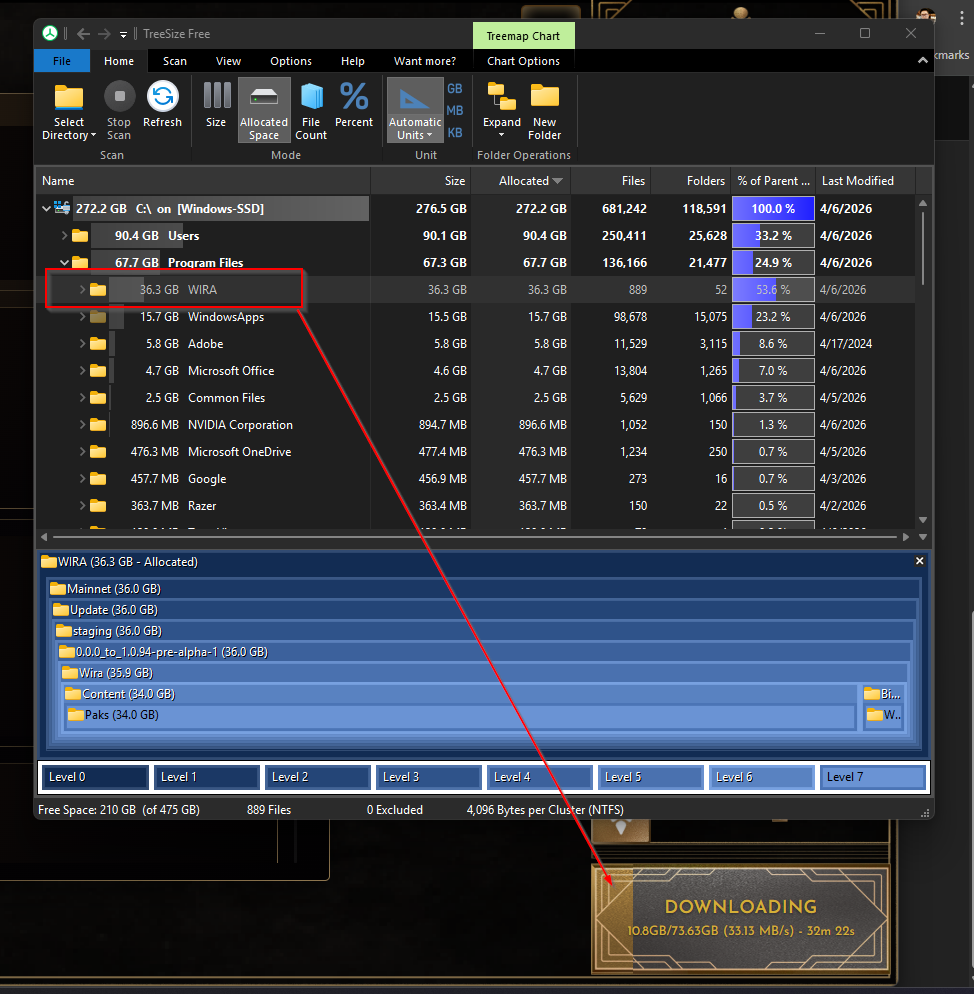
2026-04-06 23_24_15-974×994 185 KB
Expected Result: Can start game normally.
Actual Result: Stuck at downloading
Frequency: Every time
System Specifications
OS:
Windows 11 Home 64-bit
Processor:
11th Gen Intel core i7
Memory:
16 GB RAM
Graphics:
NVIDIA GeForce MX450
DirectX:
Version 12
Storage:
500GB SSD
2 Likes
Greetings @raychin1991,
Thank you for creating a new topic for the issue you are facing as mentioned. The team is currently looking into it.
In the meantime, do let us know, if you have already been able to download and access the game.
Greetings shadowzkill,
We note you are facing the same issue. Your kind patience with the following is appreciated while the team is identifying this issue. In the meantime, can you send us the following to look further into the report:
Current Laptop/PC Specifications
- OS
- Processor
- Memory
- Graphics
- DirectX
- Storage
Yes, i still have the same issue, even my files already exist in program file but the launcher still trying to re-download from 15% progress.
Hello there @raychin1991 and @shadowzkill
The latest game launcher update has rectified the issue you have been facing.
Click here to download the latest game launcher v2.3.33: Download Launcher
Yes, the issue has been resolved in the new release, but my graphic card doesn’t strong enough to play this game.
Thank you for the update @raychin1991
For improving performance, we have more optimization updates coming, including DLSS support, which should help improve FPS and overall gameplay performance on supported NVIDIA graphics cards.
WIRA is still in its Pre-Alpha stage, and performance optimization is an active part of our development process.
We appreciate your patience and support while we continue polishing the game.
1 Like